MX Player Custom Codec [AC3, DTS, MLP, TrueHD, and more]
![MX Player Custom Codec [AC3, DTS, MLP, TrueHD, and more]](/_next/image?url=https%3A%2F%2Fcms.droidfeats.com%2Fwp-content%2Fuploads%2F2020%2F03%2FMX-Player-Custom-Codec.png&w=3840&q=75)
Undoubtedly, MX Player stands out as the premier video player for Android devices. Its extensive functionality includes background playback and HW decoder capabilities, making it compatible with a broad range of file formats. For users looking to enhance their experience further, MX Player Custom Codec support allows seamless playback of even more complex media formats. The exceptional video quality it delivers surpasses that of most other media players.
What sets MX Player apart from its competitors is its remarkable flexibility, which exceeds that of any other media player. Users can customize their playback experience and access a host of unique features. Overall, MX Player truly represents the pinnacle of video playback technology for Android devices.
Whilst there are certainly benefits to using MX Player, it is worth noting that the software does have some limitations. For instance, certain audio codecs, such as AC3, DTS, MLP, and TrueHD, are not currently supported by default.
- See also: Why MX Player Pro Version 1.26.7 Remains Unbeatable (A User’s Honest Take on Updates and Downgrades)
Thankfully, there is a solution for those who wish to utilize these codecs whilst still enjoying the functionality of MX Player. Custom Codec for MX Player, a script created by the skilled developers at XDA, allows users to overcome these limitations and take full advantage of the player’s capabilities.
To obtain the Custom Codec, kindly download the ZIP file that corresponds to your device’s architecture, such as ARM, Tegra, Neon, and the like.
MX Player Custom Codec
MX Player Codec Pack contains ffmpeg library along with many other libraries which are required to insure that the player is working properly. If you download MX Player from Play Store, it will contain only the required libraries as per your device architecture. Sometimes you need to install Codec packs from Google Play Store (if MX Player ask to do so). But Custom Codec is additional which is a modified version of the ffmpeg library used in MX Player.
It supports DTS/Dolby (ac3) audio tracks. So, Codec packs from Play Store are mandatory if MX Player asks the user to install it. Custom Codec is optional if you want to play the videos with DTS & Dolby (AC3) audio tracks.
- Trending now: Do a Barrel Roll 20 Times on Google (Game Tricks)
Download MX Player Custom Codec (& MX Player AIO ZIP)
Download the Custom Codec ZIP files for both MX Player and MX Player Pro using the links provided. Ensure that you select the appropriate ZIP version based on your device’s architecture.
If you are uncertain about your device’s architecture, download the mx_aio.zip file (MX Player AIO ZIP). This all-in-one Codec is compatible with any device.
Last update: March 6, 2026
V1.87.0 Custom Codec (Current stable)
For the newer version of MX Player, older links may not work. You may find the following error:
Can't find custom codec. Please use version. Please use version 1.87.0 Codec!In that case, use the current stable version (1.87.0) from the links below:
- FFMPEG updated as to Nov 22, 2024
| SR | Download links | Size |
|---|---|---|
| 1 | libffmpeg.mx.so.neon.1.87.0 | 12.0 MB |
| 2 | libffmpeg.mx.so.neon64.1.87.0 | 12.2 MB |
| 3 | libffmpeg.mx.so.x86.1.87.0 | 14.7 MB |
| 4 | libffmpeg.mx.so.x86_64.1.87.0 | 13.4 MB |
| 5 | mx_neon.zip | 6.03 MB |
| 6 | mx_neon64.zip | 5.88 MB |
| 7 | mx_x86.zip | 6.73 MB |
| 8 | mx_x86_64.zip | 6.16 MB |
FFmpeg APK files
| Standard Edition | APK files |
|---|---|
| arm-v7a / arm64-v8a | Download link |
| x86 / x86_64 | Download link |
| Pro Edition | APK files |
|---|---|
| arm64-v8a | Download link |
| arm-v7a | Download link |
| x86_64 | Download link |
| x86 | Download link |
Older releases
MX Player Custom Codec 1.49.0
| SR | Download links | Size |
|---|---|---|
| 1 | libffmpeg.mx.so.neon.1.49.0 | 12.1 MB |
| 2 | libffmpeg.mx.so.neon64.1.49.0 | 12.2 MB |
| 3 | libffmpeg.mx.so.x86.1.49.0 | 14.7 MB |
| 4 | libffmpeg.mx.so.x86_64.1.49.0 | 13.4 MB |
| 5 | mx_neon.zip | 6.04 MB |
| 6 | mx_neon64.zip | 5.89 MB |
| 7 | mx_x86.zip | 6.74 MB |
| 8 | mx_x86_64.zip | 6.17 MB |
MX Player Custom Codec 1.44.0
- FFMPEG “Ada” updated as to 2022-01-30 (if those binaries changes mean anything)
- libmp3lame (mp3 encoder) enabled in our config now
- mxv muxer enabled (another video format?)
| SR | Download links | Size |
|---|---|---|
| 1 | libffmpeg.mx.so.neon.1.44.0 | 12.1 MB |
| 2 | libffmpeg.mx.so.neon64.1.44.0 | 12.2 MB |
| 3 | libffmpeg.mx.so.x86.1.44.0 | 14.7 MB |
| 4 | libffmpeg.mx.so.x86_64.1.44.0 | 13.4 MB |
| 5 | mx_aio.zip | 24.8 MB |
| 6 | mx_neon.zip | 6.03 MB |
| 7 | mx_neon64.zip | 5.89 MB |
| 8 | mx_x86.zip | 6.74 MB |
| 9 | mx_x86_64.zip | 6.16 MB |
MX Player Custom Codec 1.35.0
| SR | Custom Codec (file name) | Download |
| 1 | mx_aio.zip | [Download Link] |
| 2 | mx_x86.zip | [Download Link] |
| 3 | mx_neon.zip | [Download Link] |
| 4 | mx_tegra2.zip | [Download Link] |
| 5 | mx_tegra3.zip | [Download Link] |
| 6 | mx_neon64.zip | [Download Link] |
| 7 | mx_x86_64.zip | [Download Link] |
MX Player Custom Codec 1.32.0
| SR | Custom Codec (file name) | Download |
|---|---|---|
| 1 | mx_x86.zip | [Download Link] |
| 2 | mx_x86_64.zip | [Download Link] |
| 3 | mx_neon64.zip | [Download Link] |
| 4 | mx_neon.zip | [Download Link] |
| 5 | mx_aio.zip | [Download Link] |
You may find the following articles interesting as well:
- Stream unlimited: Download Cartoon HD APK V3.0.3 (Official update | Latest)
- Sound mod: Install ViPER4Android on Android 10 / Android Q
- Xposed Framework: Install Xposed Framework on Android 10 (How-to GUIDE)
How to install MX Player Custom Codec
- Open MX Player App.
- Tab on the three-dot (located at the top right corner)
- You will find the following settings:
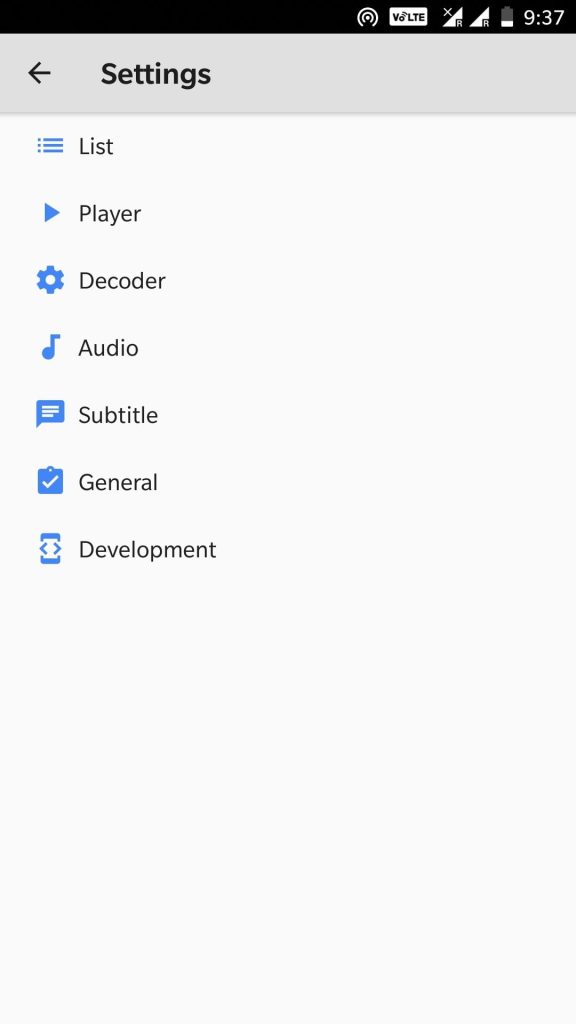
- Tab on Decoder option. You will see many settings like SW Audio, CPU Limit, and Color Format. Just scroll down to General Settings. You will find Custom Codec option there.
- Check what type of Custom Codec is needed. In my case, it’s ARMv7 Neon type Custom Codec.
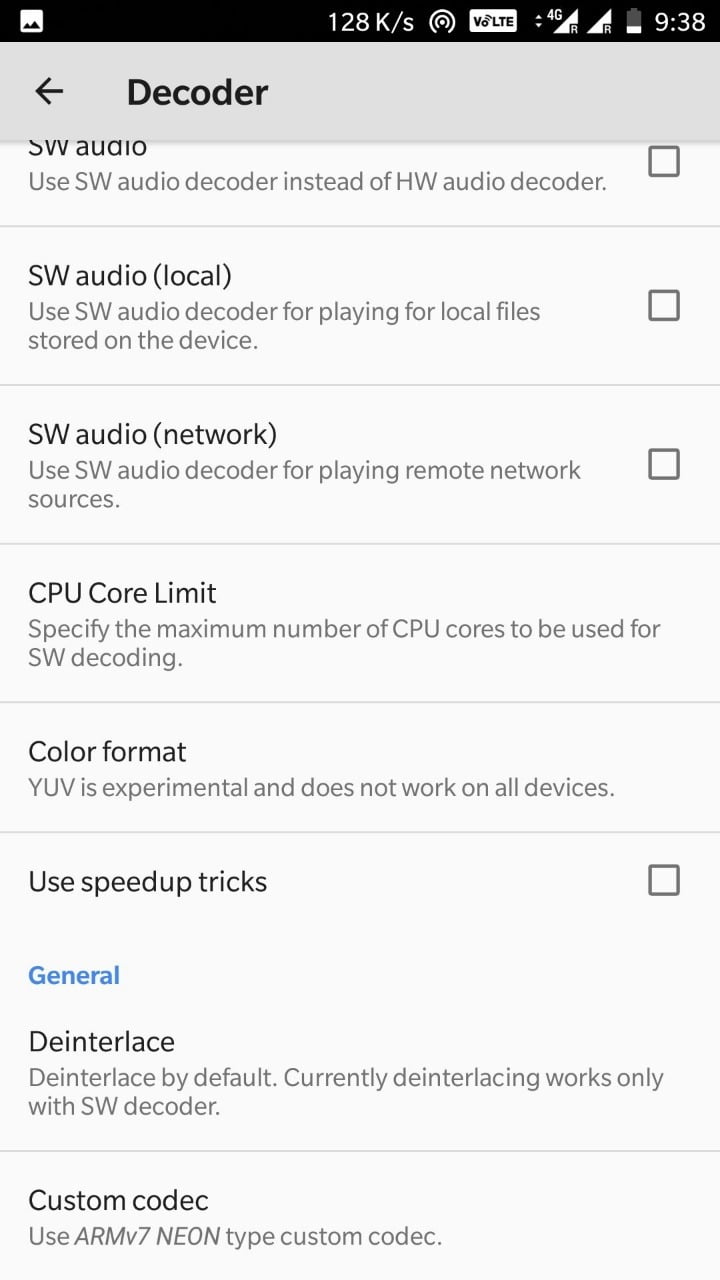
- Tap on Custom Codec option and choose the ZIP file that you had downloaded.
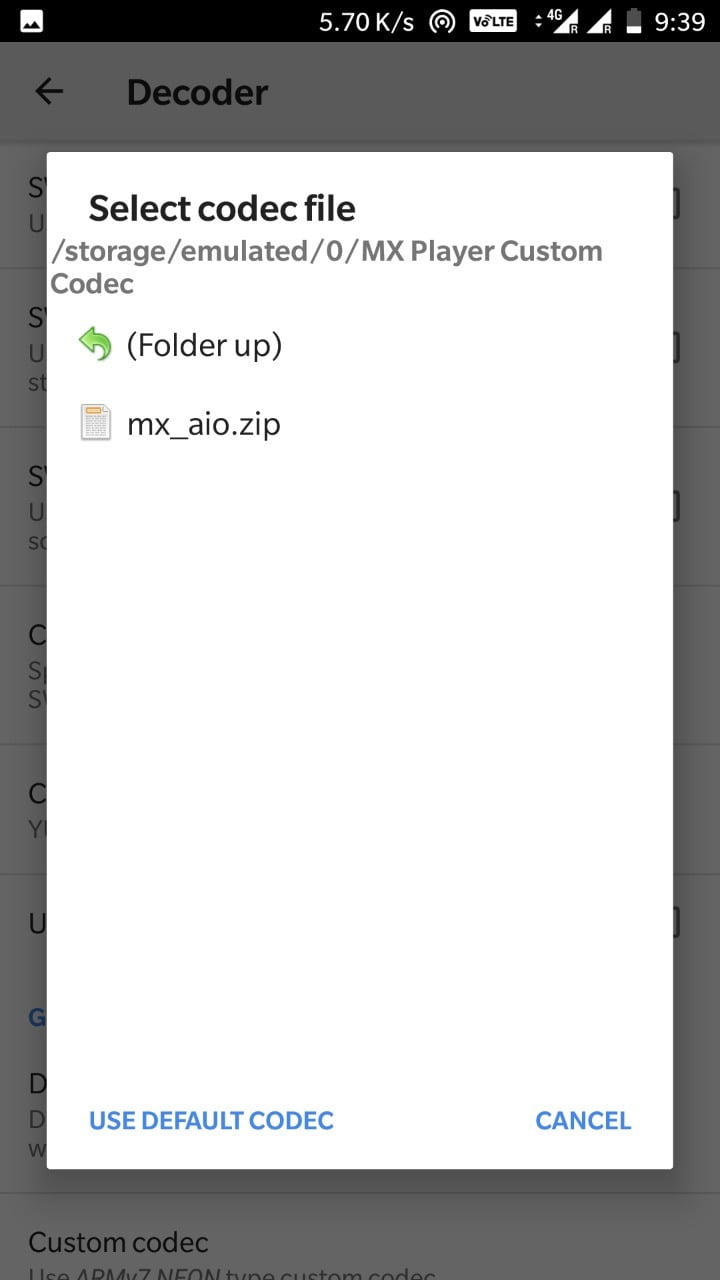 In my case, I had downloaded AIO (All-in-one) pack.
 - Once you select, it will ask you to tab on OK to restart the App.
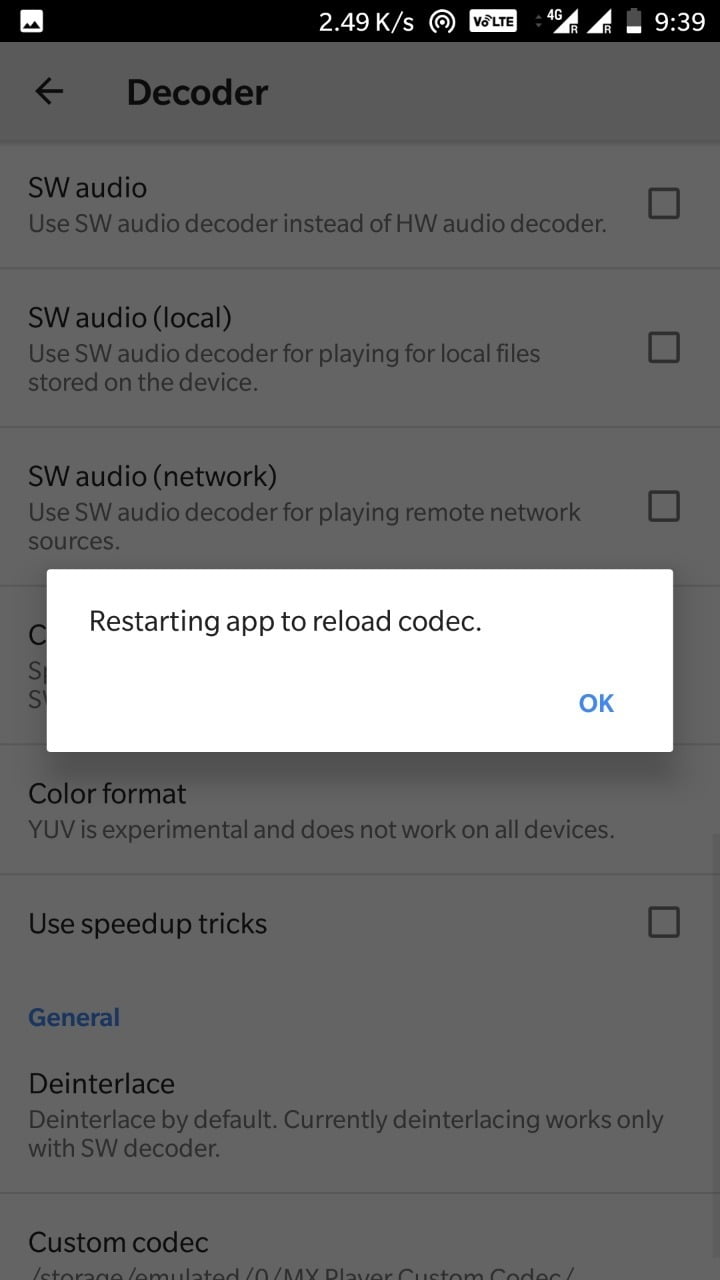
- Do that and you are done!
When using the AIO Codec pack, MX Player will automatically install any necessary Codec from the ZIP file. Once the installation is complete, MX Player will restart with the newly installed Codec, allowing you to enjoy DTS audio on MX Player without any issues. You can now play any audio or video clip on MX Player without encountering any problems.
What to do when you update MX Player?
If MX Player is updated to a more recent version without any modifications to the ffmpeg library, there’s no need to be concerned about updating the Custom Codec. It will stay the same. If it is not compatible, MX Player will not load it.
Each time MX Player updates with a new version of the ffmpeg library, it will verify the loaded Custom Codec. If the Codec is outdated, an error message will be displayed:
“Custom Codec is out of date. Replace it with the new version”
In that situation, please download the latest version of the Custom Codec for MX Player and proceed with the update. Otherwise, maintain the current Codec without making any changes.
And that concludes our discussion on MX Player Custom Codec. If you encountered any problems with it, please feel free to leave a comment below. And if you found this post to be informative and useful, we would greatly appreciate it if you could share it with others. Thank you for your time and attention.
![Download GCam Nikita Port [Most Compatible Version for any Android smartphone]](/_next/image?url=https%3A%2F%2Fcms.droidfeats.com%2Fwp-content%2Fuploads%2F2025%2F09%2FGCam-Nikita-Port.webp&w=3840&q=75)
![Download Redmi 15 GCam Port [Most Compatible Version]](/_next/image?url=https%3A%2F%2Fcms.droidfeats.com%2Fwp-content%2Fuploads%2F2025%2F08%2FRedmi-15.webp&w=3840&q=75)
![Download vivo V50 Lite GCam Port [Most Compatible Version]](/_next/image?url=https%3A%2F%2Fcms.droidfeats.com%2Fwp-content%2Fuploads%2F2025%2F08%2Fvivo-V50-Lite.webp&w=3840&q=75)